
Airpals logo
    MULTI-CARRIER SHIPPING
  • Create Shipping Labels
  • Compare Shipping Rates
  • AI Shipping AssistantBETA
  • BOOK COURIER & MESSENGER
  • New York Messenger Service
  • Same-Day Courier Other Cities
  • Workplace Logistics Platform
    USE CASES
  • Workplace Logistics
  • Facilities Management
  • BY INDUSTRY
  • Pharma Manufacturing
  • Fashion And Apparel
PricingAbout UsContact Us
Log InTalk to Sales
Log InTalk to Sales
  1. Home
  2. Workplace & Facility Operations
  3. What Shipping Automation Can Simplify in Daily Workplace Operation
shipping automation
• 8 min read

What Shipping Automation Can Simplify in Daily Workplace Operation

See how shipping automation helps workplace teams reduce manual tasks, centralize tracking, manage costs, and keep daily shipping easier to control.
Author avatar
Isa CarbonellPublished: Jun 29, 2026Updated: Jun 30, 2026

Shipping is still one of the most manual parts of workplace operations. While teams use automation for procurement, IT, and expenses, shipping often remains spread across carrier portals, spreadsheets, email threads, and individual workflows.

That creates extra work for admin and operations teams: creating labels, tracking packages, comparing carriers, and reconciling costs manually.

This article explains what shipping automation means for workplace teams, why manual shipping is still so common, and which daily tasks can be automated to save time, improve visibility, and make shipping activity easier to manage.

What Shipping Automation Means for Workplace Operations

Most discussions about shipping automation focus on e-commerce fulfillment centers, warehouse operations, or customer deliveries. While those use cases are important, workplace operations teams face a different set of shipping challenges.

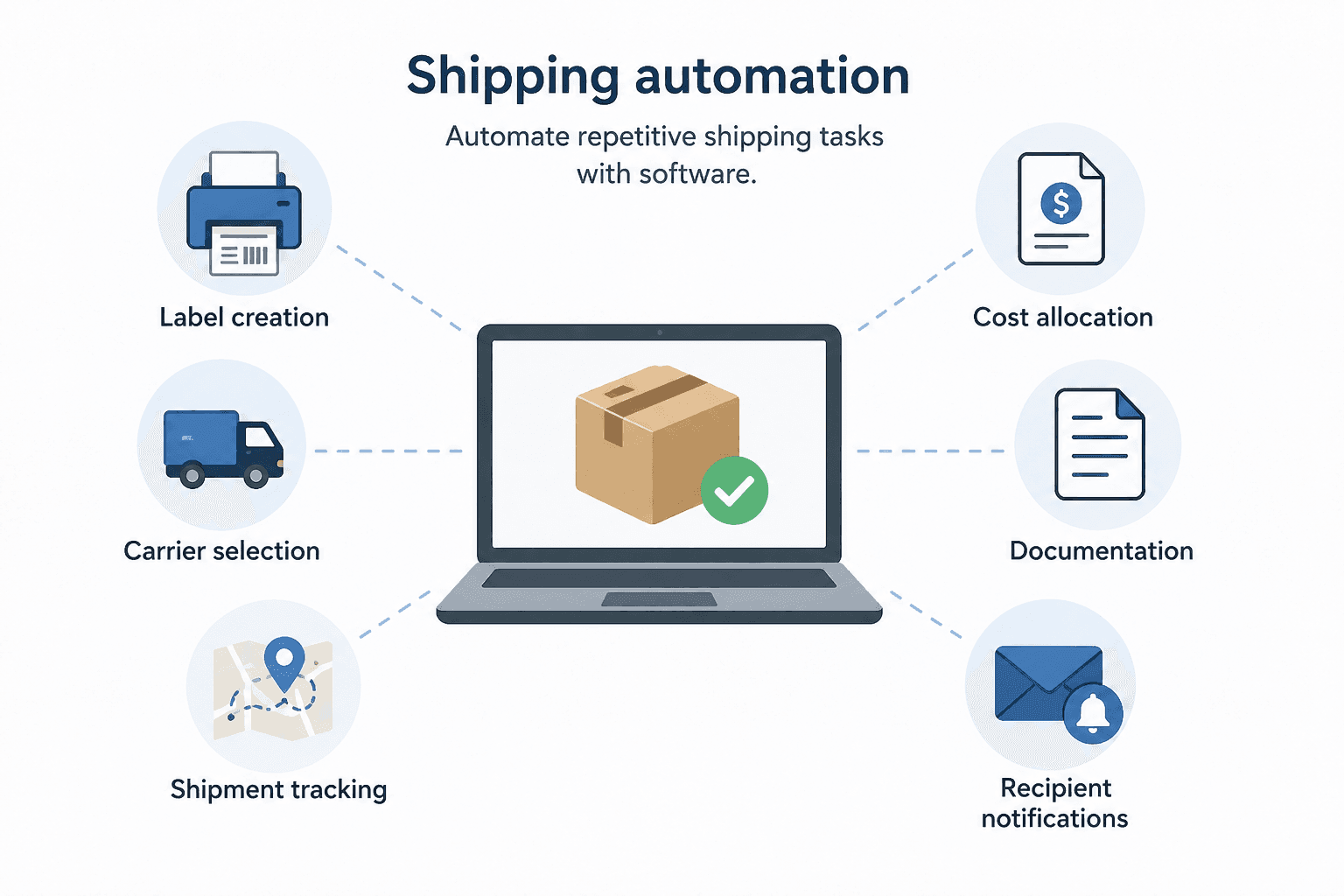
In a workplace environment, automation in shipping refers to using software to automate repetitive, rule-based tasks involved in creating, tracking, managing, and documenting shipments across offices, departments, employees, and carriers.

The goal is not to remove people from the process entirely. Instead, it is to eliminate repetitive administrative work so operations teams can focus on coordination, planning, and workplace support.

What Internal Shipping Includes in a common workplace

Many organizations manage a significant amount of internal shipping activity without realizing how much operational effort it requires.

Examples include:

  • Equipment shipments, uniforms, badges, and other company assets
  • Contracts, legal documents, and sensitive paperwork are sent between offices
  • Product samples shipped to prospects, customers, and partners
  • Office supplies and facility materials transferred between locations
  • Conference and event materials, boxes, and other supplies

These shipments happen every day across different teams and locations, creating a lot of administrative work that can be difficult to manage.

Who Manages It and How It Breaks Down

Unlike procurement or expense management, internal shipping rarely has a dedicated owner. The responsibility often falls to whoever is closest to the process, including office managers, executive assistants, workplace operations teams, or mailroom staff, just to name a few.

As a result, different teams often develop their own shipping workflows. Some use UPS, others prefer FedEx, and others create shipments through whichever carrier account is available. Shipment records may live in spreadsheets, email inboxes, or not exist at all. Costs are frequently charged to whichever department card happens to be used at the time.

Why Most Workplaces Still Rely on Manual Shipping Processes

Despite advances in automation in workplace operations, shipping remains one of the least standardized administrative functions in many organizations.

One reason is that shipping rarely receives the same level of attention as procurement, finance, or IT workflows. Most companies have approved systems for expense reporting and purchasing, but few have an organization-wide shipping platform.

Another challenge is that carrier portals are designed around individual carriers. Teams using UPS, FedEx, DHL, and USPS often need to navigate multiple systems simultaneously. Each platform has different workflows, reporting tools, and account structures.

Additionally, shipping responsibilities are usually distributed across multiple departments. Since no single team owns the process, opportunities for improvement often go unnoticed.

Many organizations also assume their shipping volume is too small to justify automation. However, when shipping activity is spread across multiple offices, departments, and employees, the administrative burden adds up quickly.

The Hidden Cost of Manual Shipping

The highest cost of manual shipping is not necessarily postage. It is the operational time spent managing routine administrative tasks.

Employees spend time creating labels, entering addresses, comparing carrier options, searching for tracking updates, responding to shipment inquiries, organizing receipts, and reconciling shipping charges. Lost packages often require additional investigation and communication.

Individually, these tasks seem minor. Collectively, they create operational waste that pulls workplace teams away from more strategic responsibilities.

Daily Shipping Tasks That Shipping Automation Can Handle

Modern automated shipping systems can eliminate many of the repetitive tasks that consume time across workplace operations teams:

Label Creation and Carrier Selection

Creating shipping labels is one of the most common manual tasks in workplace logistics.

Without automation, employees often log into separate carrier websites, manually enter recipient information, compare shipping options, and create labels one shipment at a time.

With automated shipping software, labels can be generated from a single platform. Carrier selection rules can automatically recommend or select the best option based on destination, package weight, delivery speed, or cost.

Address information can also be stored and reused with an address book, reducing data entry errors and minimizing delivery issues caused by incorrect shipment details.

Shipment Tracking and Status Visibility

Tracking shipments manually becomes increasingly difficult as shipping volume grows.

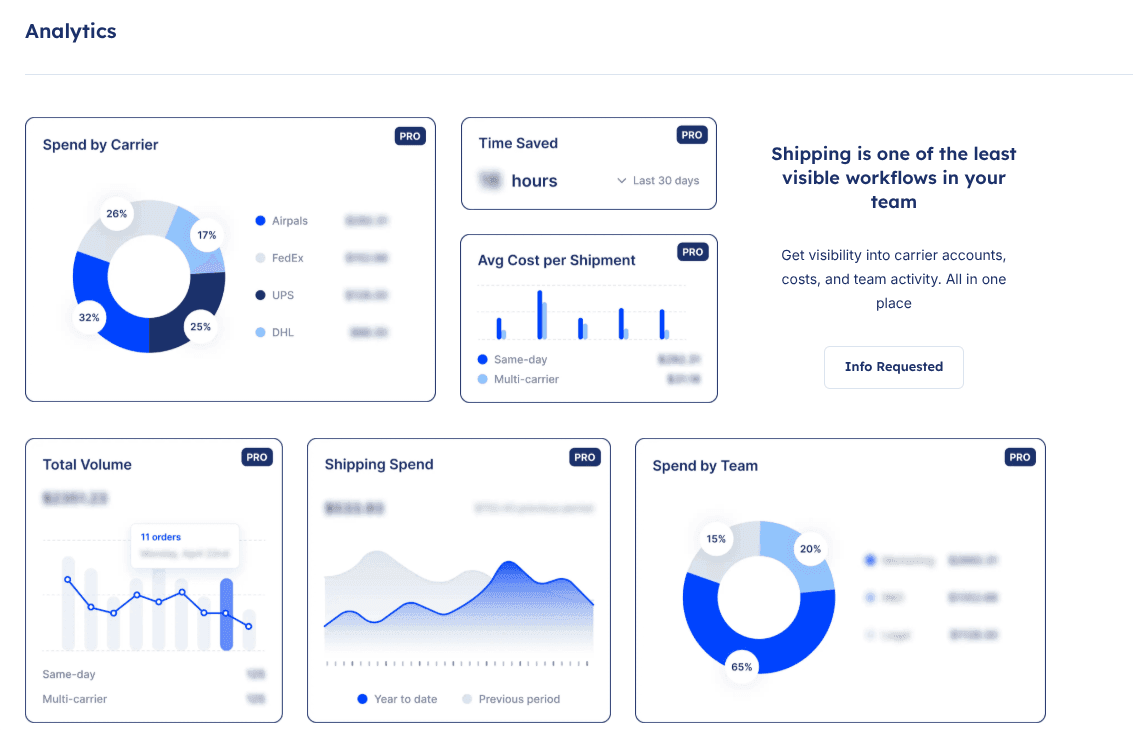
Instead of checking multiple carrier websites individually, a shipping automation software consolidates tracking information into a single dashboard. Active shipments can be monitored in real time regardless of the carrier.

Automated status updates also reduce the number of questions from employees waiting for packages.

Expense Allocation and Cost Reporting

Shipping expenses are often scattered across department budgets, company credit cards, reimbursement requests, and carrier invoices.

With automated shipping systems, shipping costs can be assigned automatically to the correct department, project, location, or cost center when the shipment is created.

This provides finance teams with a consolidated view of shipping spend while giving operations leaders access to reporting by location, carrier, department, or time period.
shipping automation software

Shipment Records and Documentation

Many organizations still rely on spreadsheets or email folders to track shipping activity. Others have no centralized records at all.

With shipping automation, every shipment is automatically documented. Records can include sender information, recipient details, carrier selection, tracking numbers, shipment costs, delivery status, and shipment dates.

This creates a complete audit trail without requiring manual recordkeeping and supports operational reporting, compliance reviews, and internal accountability.

Recipient Notifications

One of the simplest yet most valuable automation features is automated communication.

Instead of manually sending tracking numbers or delivery updates, recipients receive notifications automatically when shipments are created, in transit, delayed, or delivered.

This is particularly useful when shipping equipment to remote employees or sending important documents that require visibility throughout the delivery process.

By removing repetitive communication tasks, teams can automate office tasks that previously required constant follow-up.
automated shipping

What Shipping Automation Looks Like in a Centralized Workplace Logistics Platform

Most workplace shipping environments are highly fragmented. Carrier portals, spreadsheets, email threads, shipping receipts, and tracking pages all exist separately, making it difficult to gain a complete view of shipping activity.

A centralized workplace logistics platform replaces these disconnected workflows with a single operational system.

Teams can create shipments, compare carriers, generate labels, track packages, manage expenses, and access shipment history through a single interface. Instead of relying on individual employees to maintain records, the platform automatically captures shipment data as part of the workflow.

Real-time visibility allows operations, workplace, facilities, and finance teams to see active shipments across the organization. Historical records remain accessible for reporting, budgeting, and operational analysis.

Airpals Workplace Logistics Platform centralizes shipping activity for workplace operations teams. By replacing fragmented carrier portals and manual processes with a single system of record, organizations can reduce administrative work, improve shipping visibility, and create accountability for every shipment.

Key Takeaways

  • Any workplace that regularly manages internal shipments can benefit from automating repetitive shipping tasks.
  • Many shipping costs stem from manual tasks such as creating labels, tracking packages, updating shipment information, reviewing expenses, and maintaining records.
  • Shipping automation software brings all shipping activities into one place, making it easier to track shipments, reduce administrative work, and keep records organized.
  • The best shipping software makes the easiest process the right process by automatically documenting and organizing shipping activities for employees.

From Fragmented to Centralized: Making Shipping Work Automatically

Shipping automation is not simply a technology initiative. It is an operational decision to stop managing workplace shipping through disconnected tools, manual processes, and individual habits.

As organizations become more distributed, the need for visibility, consistency, and accountability continues to grow. Shipping activities that once seemed manageable through spreadsheets and carrier portals can quickly become difficult to track across multiple teams and locations.

By centralizing shipping workflows, organizations can reduce administrative burden, improve cost visibility, simplify shipment management, and create reliable records automatically.

If your team still relies on spreadsheets, email threads, and multiple carrier portals to manage workplace shipping, Airpals might be a great fit to streamline your shipping needs.
automated shipping systems

Frequently Asked Questions (FAQs)

What is shipping automation?

Shipping automation is the use of software to automate repetitive shipping tasks such as label creation, carrier selection, shipment tracking, cost allocation, documentation, and recipient notifications.

What shipping tasks can be automated?

The shipping tasks that can be automated are label creation, shipment tracking, carrier selection, expense allocation, shipment records management, delivery notifications, and reporting, just to name a few.

What is the difference between shipping automation for e-commerce and workplace operations?

The difference between e-commerce and workplace operations is that e-commerce shipping automation focuses on customer order fulfillment and warehouse operations, and on the other hand, workplace shipping automation focuses on managing internal shipments such as employee equipment, office supplies, documents, and interoffice deliveries.

How does shipping automation improve cost visibility?

Shipping automation can improve cost visibility by automatically assigning shipments to departments, areas, projects, or locations at the time of shipment, giving finance and operations teams a consolidated view of shipping spend.

Can small workplace teams benefit from shipping automation, or is it only for large organizations?

Yes, a small workplace team can also benefit from shipping automation because automation reduces administrative work, improves shipment visibility, and creates centralized records without requiring additional staff or resources.



Author:
Author avatar
Isa CarbonellBusiness Operations Coordinator
With a degree in Business Administration and a Master’s in Project Management, Isa has a strong background in operations, customer service, and cross-functional coordination. Her work focuses on improving processes, supporting team collaboration, and helping businesses strengthen their logistics operations.
What is Airpals?We help companies streamline corporate shipping by centralizing all carrier accounts in one place to drive operational efficiency: from FedEx and UPS to same-day local couriers.Learn More
The First AI-Powered Shipping Platform
An airpal orchestrating the delivery
Let AI handle it for you! Compare rates in seconds and get up to 89% discounts from top carriers.Try our AI Shipping Calculator

Shipping is still one of the most manual parts of workplace operations. While teams use automation for procurement, IT, and expenses, shipping often remains spread across carrier portals, spreadsheets, email threads, and individual workflows.

That creates extra work for admin and operations teams: creating labels, tracking packages, comparing carriers, and reconciling costs manually.

This article explains what shipping automation means for workplace teams, why manual shipping is still so common, and which daily tasks can be automated to save time, improve visibility, and make shipping activity easier to manage.

What Shipping Automation Means for Workplace Operations

Most discussions about shipping automation focus on e-commerce fulfillment centers, warehouse operations, or customer deliveries. While those use cases are important, workplace operations teams face a different set of shipping challenges.

In a workplace environment, automation in shipping refers to using software to automate repetitive, rule-based tasks involved in creating, tracking, managing, and documenting shipments across offices, departments, employees, and carriers.

The goal is not to remove people from the process entirely. Instead, it is to eliminate repetitive administrative work so operations teams can focus on coordination, planning, and workplace support.

What Internal Shipping Includes in a common workplace

Many organizations manage a significant amount of internal shipping activity without realizing how much operational effort it requires.

Examples include:

  • Equipment shipments, uniforms, badges, and other company assets
  • Contracts, legal documents, and sensitive paperwork are sent between offices
  • Product samples shipped to prospects, customers, and partners
  • Office supplies and facility materials transferred between locations
  • Conference and event materials, boxes, and other supplies

These shipments happen every day across different teams and locations, creating a lot of administrative work that can be difficult to manage.

Who Manages It and How It Breaks Down

Unlike procurement or expense management, internal shipping rarely has a dedicated owner. The responsibility often falls to whoever is closest to the process, including office managers, executive assistants, workplace operations teams, or mailroom staff, just to name a few.

As a result, different teams often develop their own shipping workflows. Some use UPS, others prefer FedEx, and others create shipments through whichever carrier account is available. Shipment records may live in spreadsheets, email inboxes, or not exist at all. Costs are frequently charged to whichever department card happens to be used at the time.

Why Most Workplaces Still Rely on Manual Shipping Processes

Despite advances in automation in workplace operations, shipping remains one of the least standardized administrative functions in many organizations.

One reason is that shipping rarely receives the same level of attention as procurement, finance, or IT workflows. Most companies have approved systems for expense reporting and purchasing, but few have an organization-wide shipping platform.

Another challenge is that carrier portals are designed around individual carriers. Teams using UPS, FedEx, DHL, and USPS often need to navigate multiple systems simultaneously. Each platform has different workflows, reporting tools, and account structures.

Additionally, shipping responsibilities are usually distributed across multiple departments. Since no single team owns the process, opportunities for improvement often go unnoticed.

Many organizations also assume their shipping volume is too small to justify automation. However, when shipping activity is spread across multiple offices, departments, and employees, the administrative burden adds up quickly.

The Hidden Cost of Manual Shipping

The highest cost of manual shipping is not necessarily postage. It is the operational time spent managing routine administrative tasks.

Employees spend time creating labels, entering addresses, comparing carrier options, searching for tracking updates, responding to shipment inquiries, organizing receipts, and reconciling shipping charges. Lost packages often require additional investigation and communication.

Individually, these tasks seem minor. Collectively, they create operational waste that pulls workplace teams away from more strategic responsibilities.

Daily Shipping Tasks That Shipping Automation Can Handle

Modern automated shipping systems can eliminate many of the repetitive tasks that consume time across workplace operations teams:

Label Creation and Carrier Selection

Creating shipping labels is one of the most common manual tasks in workplace logistics.

Without automation, employees often log into separate carrier websites, manually enter recipient information, compare shipping options, and create labels one shipment at a time.

With automated shipping software, labels can be generated from a single platform. Carrier selection rules can automatically recommend or select the best option based on destination, package weight, delivery speed, or cost.

Address information can also be stored and reused with an address book, reducing data entry errors and minimizing delivery issues caused by incorrect shipment details.

Shipment Tracking and Status Visibility

Tracking shipments manually becomes increasingly difficult as shipping volume grows.

Instead of checking multiple carrier websites individually, a shipping automation software consolidates tracking information into a single dashboard. Active shipments can be monitored in real time regardless of the carrier.

Automated status updates also reduce the number of questions from employees waiting for packages.

Expense Allocation and Cost Reporting

Shipping expenses are often scattered across department budgets, company credit cards, reimbursement requests, and carrier invoices.

With automated shipping systems, shipping costs can be assigned automatically to the correct department, project, location, or cost center when the shipment is created.

This provides finance teams with a consolidated view of shipping spend while giving operations leaders access to reporting by location, carrier, department, or time period.

shipping automation software

Shipment Records and Documentation

Many organizations still rely on spreadsheets or email folders to track shipping activity. Others have no centralized records at all.

With shipping automation, every shipment is automatically documented. Records can include sender information, recipient details, carrier selection, tracking numbers, shipment costs, delivery status, and shipment dates.

This creates a complete audit trail without requiring manual recordkeeping and supports operational reporting, compliance reviews, and internal accountability.

Recipient Notifications

One of the simplest yet most valuable automation features is automated communication.

Instead of manually sending tracking numbers or delivery updates, recipients receive notifications automatically when shipments are created, in transit, delayed, or delivered.

This is particularly useful when shipping equipment to remote employees or sending important documents that require visibility throughout the delivery process.

By removing repetitive communication tasks, teams can automate office tasks that previously required constant follow-up.

automated shipping

What Shipping Automation Looks Like in a Centralized Workplace Logistics Platform

Most workplace shipping environments are highly fragmented. Carrier portals, spreadsheets, email threads, shipping receipts, and tracking pages all exist separately, making it difficult to gain a complete view of shipping activity.

A centralized workplace logistics platform replaces these disconnected workflows with a single operational system.

Teams can create shipments, compare carriers, generate labels, track packages, manage expenses, and access shipment history through a single interface. Instead of relying on individual employees to maintain records, the platform automatically captures shipment data as part of the workflow.

Real-time visibility allows operations, workplace, facilities, and finance teams to see active shipments across the organization. Historical records remain accessible for reporting, budgeting, and operational analysis.

Airpals Workplace Logistics Platform centralizes shipping activity for workplace operations teams. By replacing fragmented carrier portals and manual processes with a single system of record, organizations can reduce administrative work, improve shipping visibility, and create accountability for every shipment.

Key Takeaways

  • Any workplace that regularly manages internal shipments can benefit from automating repetitive shipping tasks.
  • Many shipping costs stem from manual tasks such as creating labels, tracking packages, updating shipment information, reviewing expenses, and maintaining records.
  • Shipping automation software brings all shipping activities into one place, making it easier to track shipments, reduce administrative work, and keep records organized.
  • The best shipping software makes the easiest process the right process by automatically documenting and organizing shipping activities for employees.

From Fragmented to Centralized: Making Shipping Work Automatically

Shipping automation is not simply a technology initiative. It is an operational decision to stop managing workplace shipping through disconnected tools, manual processes, and individual habits.

As organizations become more distributed, the need for visibility, consistency, and accountability continues to grow. Shipping activities that once seemed manageable through spreadsheets and carrier portals can quickly become difficult to track across multiple teams and locations.

By centralizing shipping workflows, organizations can reduce administrative burden, improve cost visibility, simplify shipment management, and create reliable records automatically.

If your team still relies on spreadsheets, email threads, and multiple carrier portals to manage workplace shipping, Airpals might be a great fit to streamline your shipping needs.

automated shipping systems

Frequently Asked Questions (FAQs)

What is shipping automation?

Shipping automation is the use of software to automate repetitive shipping tasks such as label creation, carrier selection, shipment tracking, cost allocation, documentation, and recipient notifications.

What shipping tasks can be automated?

The shipping tasks that can be automated are label creation, shipment tracking, carrier selection, expense allocation, shipment records management, delivery notifications, and reporting, just to name a few.

What is the difference between shipping automation for e-commerce and workplace operations?

The difference between e-commerce and workplace operations is that e-commerce shipping automation focuses on customer order fulfillment and warehouse operations, and on the other hand, workplace shipping automation focuses on managing internal shipments such as employee equipment, office supplies, documents, and interoffice deliveries.

How does shipping automation improve cost visibility?

Shipping automation can improve cost visibility by automatically assigning shipments to departments, areas, projects, or locations at the time of shipment, giving finance and operations teams a consolidated view of shipping spend.

Can small workplace teams benefit from shipping automation, or is it only for large organizations?

Yes, a small workplace team can also benefit from shipping automation because automation reduces administrative work, improves shipment visibility, and creates centralized records without requiring additional staff or resources.


Author:
Author avatar
Isa CarbonellBusiness Operations Coordinator
With a degree in Business Administration and a Master’s in Project Management, Isa has a strong background in operations, customer service, and cross-functional coordination. Her work focuses on improving processes, supporting team collaboration, and helping businesses strengthen their logistics operations.

Related Posts

workplace management
Workplace & Facility Operations

The Complete Guide to Workplace Management: Responsibilities, Tools, and Tips

Learn the workplace management definition, key responsibilities, and tools teams use to manage workplace operations.
Apr 14, 2026
laptop return
Workplace & Facility Operations

A Guide to Simplifying Laptop Returns in Remote Work

Learn how companies handle laptop returns, common challenges to avoid, and smarter ways to improve visibility during remote equipment recovery.
Apr 21, 2026
schools facilities management
Workplace & Facility Operations

7 Schools’ Facilities Management Practices That Actually Improve Operations

Improve facility management in schools with 7 practices that reduce reactive work and give teams clearer control over campus operations.
May 05, 2026
Discover more posts
Airpals white logo
Facebook icon
Instagram icon
Twitter icon
Linkedin icon
Subscribe to our newsletter
FedEx UPS USPS Boxes
USPS vs UPS vs FedEx: Shipping Rates, Delivery Speed & Key Differences
Delivery Male with Package List
How to Get Shipping Discounts for My Business? UPS, USPS and FedEx
About Us
Pricing
Messenger Service in NYC
Multi-carrier Shipping Software
Shipping Cost Calculator
Same-Day Courier Other Cities
How It Works
Share Your Feedback
Help Center
Contact Us
Blog
Sitemap
Privacy Policy
Terms & Conditions:
T&C Multi-Carrier Shipping
T&C NYC Same-Day Delivery

SOC 2 Type II certification logo
SOC 2 Type IIAICPA Certified

256-bit SSLEnd-to-end encrypted
Facebook icon
Instagram icon
Twitter icon
Linkedin icon

SOC 2 Type II certification logo
SOC 2 Type IIAICPA Certified

256-bit SSLEnd-to-end encrypted