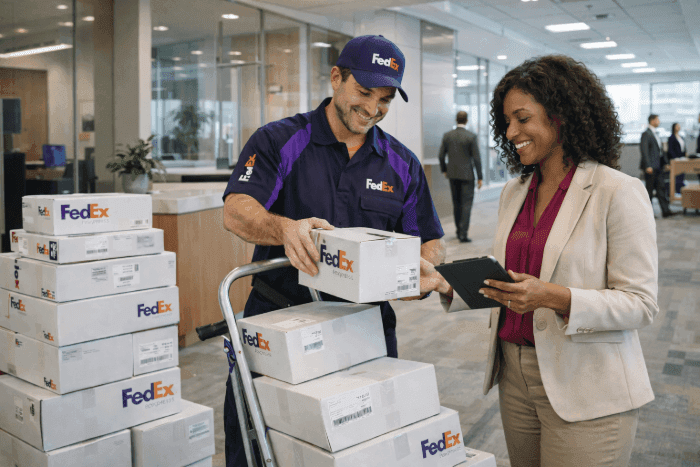
Scheduling a pickup with FedEx is often treated as a simple administrative task, but in practice, it is one of the most important control points in parcel shipping operations. A shipment only becomes operationally real once it physically leaves the building and is scanned by the carrier. Until that scan happens, the package has not officially entered the FedEx network, even if the shipping label already exists.
This guide explains how you schedule a FedEx pickup and walks through the standard FedEx pickup process step by step. It covers the information required, the moment responsibility transfers to the carrier, and what happens after a pickup is arranged, helping teams reduce delays, avoid missed shipments, and maintain visibility across locations.
Table of Contents:
- What Are Your FedEx Pickup Options?
- How Do You Schedule a FedEx Pickup: Step-by-Step
- Pickup Types: One-Time, Recurring, and Freight Pickups
- Common Problems Teams Face When Scheduling FedEx Pickups
- How Centralized Parcel Management Solves Pickup Challenges
- How Airpals Supports FedEx Pickups and Third-Party Shipping Labels
- Key Takeaways
- Final Thoughts: Smoother Shipping Starts with Better Pickup Control
- Frequently Asked Questions (FAQs)
What Are Your FedEx Pickup Options?
FedEx offers several ways to arrange pickups depending on shipment volume, urgency, and account configuration. Understanding these options helps teams decide how to setup FedEx pickup workflows that fit their operational reality.
Schedule a FedEx Pickup Online
Many organizations schedule a FedEx pickup online through their FedEx account. This option requires shipment details, pickup address, preferred date, and time window. It works well for standardized locations with predictable shipping activity. Think of it as the trustworthy service that has become an integral part of the delivery process of a small business.
Online scheduling reduces friction compared to phone-based requests, but it still relies on local execution. If the shipment is not ready or access issues occur, the pickup may fail without centralized visibility. Just make sure you’ve got everything ready to go beforehand, and this will be a breeze.
Call to Schedule a FedEx Pickup by Phone
Some teams still call to schedule a FedEx pickup using the FedEx pickup number. This approach is common for urgent or exceptional shipments. Teams may also schedule a FedEx pickup by phone when online tools are unavailable.
While calling FedEx for pickup can resolve edge cases quickly, it introduces manual steps, relies on local confirmation, and does not scale well across multiple sites or departments.
Arrange for a FedEx Pickup in Person
In limited scenarios, teams may arrange for a FedEx pickup through local FedEx facilities or pre-established routes. This still requires coordination to ensure the package physically leaves the location and is scanned correctly.
How Do You Schedule a FedEx Pickup: Step-by-Step
Don’t worry, this is quite simple. Understanding the full workflow clarifies where delays and failures typically occur.
Prepare Your Shipment Before Requesting a Pickup
Before submitting a FedEx pickup request, the shipment must be fully prepared:
- Packaging completed
- Shipping label attached
- Pickup location confirmed
- Responsible person identified
Scheduling a pickup without these elements increases the likelihood of a failed attempt, so make sure to use this 4 steps as a must-do checklist.
Submit a FedEx Pickup Request
Once the shipment is ready, teams can schedule a FedEx pickup online or call to schedule a pickup by phone. This confirms timing and location but does not guarantee collection if the shipment is unavailable or if access issues arise.
What Happens After You Schedule a FedEx Pickup
After scheduling a pickup with FedEx, the carrier attempts collection within the agreed time window. Only when the package is scanned does it officially enter the FedEx network. Failed pickups often leave shipments stranded on-site, especially when no centralized system tracks outcomes.
Pickup Types: One-Time, Recurring, and Freight Pickups
Pickup requirements vary by operation:
- One-time pickups support occasional shipments
- Recurring pickups serve predictable daily or weekly volume
- Freight pickups apply to palletized or oversized shipments
Each pickup type influences how teams set up FedEx pickup workflows and assign accountability.
Common Problems Teams Face When Scheduling FedEx Pickups
As organizations scale, decentralized FedEx pickup scheduling creates operational blind spots that are easy to overlook but hard to manage. In many enterprise environments, shipping labels are generated by third parties such as external vendors, repair partners, or labs. Local teams are then responsible for packaging the item and arranging the pickup, creating a disconnect between label creation and the moment the package actually leaves the building.
This pattern is common in multi-site organizations like school networks, healthcare systems, or retail chains, where each location handles FedEx pickups independently. Central teams have no direct confirmation that a shipment was picked up and often rely on emails, messages, or verbal check-ins.
When pickup outcomes are not tracked alongside shipment activity, these challenges spill into broader parcel visibility and operational efficiency issues. What starts as a pickup coordination problem quickly becomes a source of delays, uncertainty, and unnecessary manual work.
Common mistakes teams make when scheduling FedEx pickups include:
- Assuming that creating a shipping label means the package has already left the building
- Relying on informal follow-ups instead of verifiable pickup confirmation
- Treating pickups as simple administrative tasks rather than critical control points
- Lacking alerts or visibility into failed or missed pickups
At scale, these gaps compound quickly, consuming significant time and effort while leaving teams without confidence that shipments are moving as expected.
How Centralized Parcel Management Solves Pickup Challenges
When teams lack a reliable way to confirm whether FedEx pickups actually occurred, shipment tracking breaks down before the package even enters the carrier’s network. This is where centralized parcel management becomes essential. Rather than relying on assumptions or manual follow-ups, it creates a clear system of record)that connects pickup scheduling with real shipment status across all locations.
Adding a centralized parcel management layer does not replace FedEx or existing partners. It structures how pickup scheduling and shipment visibility are managed across locations, turning fragmented, local actions into a shared, operational view for central teams.
Visibility into Pickup Status Across All Locations
A package might be packed and labeled, but is it still sitting in a closet? Was the FedEx pickup ever scheduled? Did the carrier actually collect it?
Airpals solves this by centralizing pickup and shipment visibility across all locations in a single dashboard. Teams can instantly see which shipments are still pending pickup, which have been collected by the carrier, and which failed or never left the building. This eliminates the need for constant emails, messages, and check-ins just to confirm whether a shipment actually happened.
Instead of asking, “Did this school already send the box?” teams get a clear, real-time answer. Visibility shifts from being anecdotal and location-dependent to operational and reliable, allowing teams to manage exceptions instead of chasing updates.
Automating and Tracking FedEx Pickup Requests
In many business environments, scheduling a FedEx pickup often happens informally. Someone at each location is responsible for calling the carrier or submitting a request, and once that’s done, there is rarely a clear record of whether the pickup occurred as planned.
Airpals turns FedEx pickup scheduling into a structured, trackable workflow. Pickup requests are created and managed from a single platform, and each request moves through clear, auditable states such as scheduled, completed, or failed. Every pickup is associated with a specific location, shipment, and responsible party, creating accountability without adding complexity for local teams.
Also, if a pickup doesn’t happen, our platform surfaces that signal immediately, allowing teams to act before delays turn into lost assets or stalled workflows. What was once a reactive, manual process becomes proactive, visible, and traceable.
How Airpals Supports FedEx Pickups and Third-Party Shipping Labels
Instead of leaving pickup execution and confirmation scattered across sites, Airpals gives central teams a consistent way to oversee shipments that rely on externally generated shipping labels.
By bringing third-party shipping labels into a centralized system, Airpals ensures that pickup activity is visible alongside shipment context, location, responsible team, and current status, without changing how labels are created or which carrier is used. This allows organizations to manage FedEx pickups as part of a broader parcel workflow, not as isolated, location-specific tasks.
The result is a single, reliable view of what has actually left the building across the organization. Airpals helps teams move from reactive follow-ups to proactive oversight, ensuring that shipments supported by third-party labels are progressing as expected and that issues are identified early, before they turn into delays or operational risk.
Key Takeaways
- Scheduling a FedEx pickup is a required operational step; a shipment does not enter the FedEx network until it is physically collected and scanned
- FedEx pickups can be scheduled online or by phone, but both methods still depend on the package being ready and physically handed to the carrier at the pickup location.
- Preparing the shipment before requesting a pickup is critical; missing packaging, labels, or access details are common causes of failed pickups.
- Decentralized pickup scheduling creates visibility gaps between label creation and carrier collection.
- Airpals helps centralize pickup scheduling and confirmation across locations, giving teams visibility into which shipments actually left the building.
Final Thoughts: Smoother Shipping Starts with Better Pickup Control
Knowing how to schedule a FedEx pickup is only the first step. Reliable shipping operations depend on confirming that pickups actually occur and that packages physically leave the building.
When pickup scheduling and confirmation are centralized, teams reduce uncertainty, improve accountability, and prevent shipments from stalling before they enter the carrier’s network. Visibility at this stage keeps operations moving without constant manual intervention.
If pickup coordination or third-party labels are creating friction across your locations, the Airpals team can help review your workflow and identify practical next steps. Request a demo to see how centralized pickup management works.

Frequently Asked Questions (FAQs)
How can I schedule a FedEx pickup?
You can schedule a FedEx pickup online through your FedEx account or call FedEx for pickup using the FedEx pickup number. Online scheduling works well for standardized workflows, while phone scheduling is often used for urgent or exceptional shipments that require immediate coordination or manual confirmation.
Can I schedule a FedEx pickup without an account?
Yes, it’s possible to schedule a FedEx pickup without your own FedEx account if the shipping label was created by a third party using their account. In these cases, the pickup is billed to the label owner, not the sender.
How much does it cost to schedule a FedEx pickup?
The cost to schedule a FedEx pickup depends on your FedEx service agreement, pickup frequency, and shipment type. Some service levels include pickups at no additional cost, while others charge per pickup request.
How to schedule FedEx pickup with prepaid label?
You can schedule a FedEx pickup with a prepaid label by using the tracking number from that label when booking the pickup through FedEx online or by phone. The pickup is charged to the account that created the label.
How does Airpals simplify scheduling FedEx pickups?
Airpals centralizes pickup scheduling and tracking across all locations in one system. It records pickup requests, tracks outcomes, and provides visibility into whether pickups were completed or failed, reducing manual follow-ups and helping teams confirm which shipments actually left the building.
Can Airpals manage third-party FedEx shipping labels?
Yes. Airpals can register and track FedEx shipping labels created outside the platform, giving teams centralized visibility into pickup and shipment status without replacing existing carrier agreements.
Do I still need to call FedEx for pickup if I use Airpals?
No. Airpals lets you schedule and track FedEx pickups from one centralized platform, eliminating the need for manual calls or separate requests at each location.